A product description has one job: to answer the questions a shopper can't ask you. Is this the right size? What is it made of? Will it work for what I need? Why buy it here instead of from the next tab? A photo and a price answer almost none of that. The description is where a visit turns into a sale, or doesn't.
Most store owners know this and still end up with pages that say things like "Soft, comfortable and stylish. Perfect for any occasion." That sentence could describe nearly any product ever made, which is exactly why shoppers skim past it. This guide gives you a structure you can follow for any product, three before and after examples, and a fast way to find the pages in your store that need work.
Start with what it is and who it's for
Open with one or two plain sentences that say what the product is and who it suits. Not a slogan. If someone reads only that opening line, they should already know whether to keep reading or leave.
Compare "Our best selling candle" with "A hand poured soy candle with a cedar and orange scent. Burns for about 40 hours and suits living rooms and bedrooms." The second one tells you the material, the scent, the burn time and where it fits. It also makes it easy to decide the candle isn't for you, and that is a good thing. A shopper who self selects out was never going to buy, and a shopper who stays is far more likely to.
Replace vague adjectives with specific details
The fastest way to improve a weak description is to hunt down every vague adjective and swap it for a fact. Words like soft, durable, high quality and premium cost you nothing to write and tell the reader nothing. A specific detail takes a little more effort and does far more work.
- "Soft" becomes "brushed cotton, 220 gsm, no scratchy tag."
- "Durable" becomes "double stitched seams, tested with a 15 kg load."
- "Compact" becomes "folds to 20 cm by 10 cm and weighs 340 g."
- "Long lasting battery" becomes "runs about 9 hours on one charge."
- "Great for gifts" becomes "arrives in a small kraft box, ready to give."
Only write details that are true and that you can back up. A claim you can't stand behind is worse than a vague one, because it creates a reason to return the product or leave a bad review. If you don't know a number, measure it or ask your supplier before you publish.
Say the benefit, then prove it
Shoppers don't buy features, they buy what the features do for them. A good pattern is to state the benefit and follow it immediately with the detail that makes it believable. "Stays dry in the rain, thanks to a waterproof coating and taped seams." "Easy to clean, because the cover goes in the washing machine." The benefit gives the reader a reason to care, and the proof gives them a reason to believe you.
Answer the practical questions before they're asked
A lot of returns and support emails come from questions the page never answered. Look at the last ten messages your store received and you will probably find the same few questions again and again. Put those answers in the description, ideally in a short list near the end so they are easy to find.
- Size and fit: measurements, how it runs, what the model is wearing.
- Materials and care: what it's made of and how to wash or maintain it.
- Compatibility: which devices, models or setups it works with.
- What's in the box: every piece that ships, including anything that is not included.
- Shipping and returns: a one line summary, with a link to the full policy.
Three before and after examples
These products are invented to show the pattern. Swap in your own facts.
Running socks, before: "Comfortable running socks. High quality. Available in many colours." After: "Cushioned running socks for road and trail. A merino and nylon blend that stays dry and doesn't hold smells on long runs. Seamless toe box so nothing rubs at mile ten. Sizes S to XL, true to size. Machine wash cold, tumble dry low."
Handmade soap, before: "Natural soap made with love. Smells amazing." After: "A cold process oatmeal and honey soap for dry, sensitive skin. Made with olive and coconut oils and no added fragrance, so it's gentle on hands. Each bar is about 110 g and lasts roughly a month of daily use. Cured for six weeks before it ships."
Phone case, before: "Premium protective case. Stylish design." After: "A slim case for the iPhone 15 with a raised edge that protects the screen and camera when you set the phone face down. Survives drops from about 1.5 metres in our tests. Wireless charging works without taking it off. Available in four colours."
Notice what the strong versions share. Each one says what the product is, names the material or the mechanism, includes at least one number, and answers a practical question. None of them is long, and none of them uses a word like premium.
How long should a description be?
There is no magic word count. A simple, low cost item can be fully described in 60 to 120 words. A considered purchase, such as furniture, electronics or anything expensive, usually needs 200 to 400 words, because the buyer has more questions to settle. The goal is to answer what the shopper needs, then stop. Padding a description with filler to hit a number makes it worse.
What you want to avoid is the opposite problem: a description of one line, or nothing at all. A page with no real text gives shoppers little to go on, and it gives search engines little to understand. If you want a deeper look at what counts as thin, we cover it in "How to write product descriptions that don't get flagged as thin."
Use the words your customers use
Read your reviews, your support emails and the questions people ask on social media. Notice the exact words they use for your product. If customers say "carry on backpack" and your page says "travel rucksack," you are speaking a different language from the people searching for you. Use the customer's phrase naturally in the title and in the first sentence, once, then move on. Repeating a keyword over and over reads badly and doesn't help.
Write for people who scan on a phone
Most shoppers read product pages on a small screen and they scan before they read. Put the most important information first, keep paragraphs to two or three sentences, and use a short list for specs and details that are easier to take in as a list. If you have to choose, favour the shopper's time over your own cleverness.
Don't copy the supplier's text
Pasting the manufacturer's description is the fastest way to fill a page, and it's also one of the weakest. The same words are on every other store that sells the item, so there is nothing to make yours stand out for a shopper comparing tabs, and little reason for a search engine to prefer your page. Rewrite it in your own words and add what you know from handling the product: how it feels, what surprised you, what you would tell a friend.
Common mistakes to avoid
- Vague adjectives that could describe anything.
- Putting the key details only inside an image, where shoppers and search engines can't read them.
- Copying the supplier's text word for word.
- Stuffing the same keyword into every sentence.
- Leaving out size, material or compatibility.
- Contradicting the photos, for example a different colour name than what the picture shows.
- Writing about your brand story when the shopper wants to know about the product.
How to find the weak descriptions in your whole store
Writing one good description is easy. Finding the forty that need work is the hard part. A free manual method is to export your products to a spreadsheet, add a column that counts the characters in each description, and sort from shortest to longest. The shortest ones, and the empty ones, are your first pile.
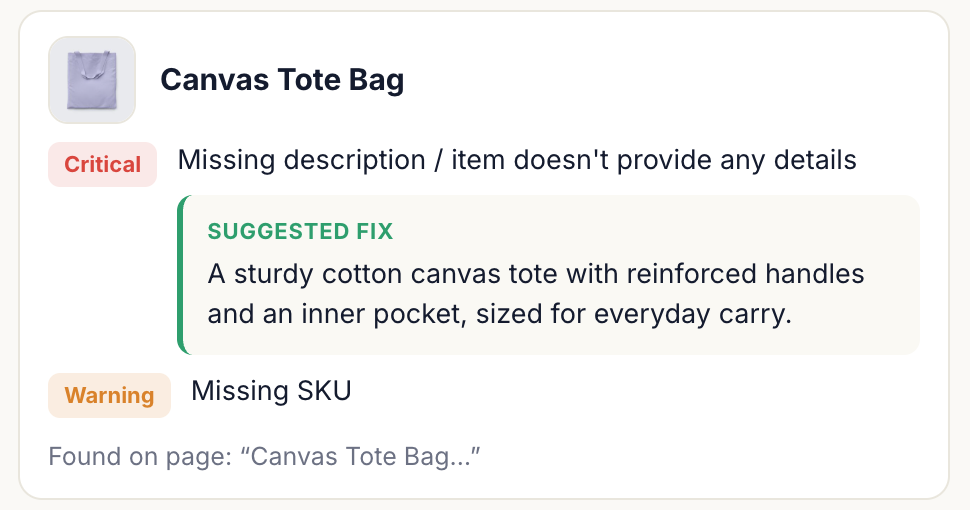
You can also scan the store. PagePolisher's free scan reads up to 30 products, flags the ones with a missing or very short description, checks spelling and grammar, flags descriptions that appear on more than one product, and writes a draft description for any product that has none, which you can edit and paste in. It works on Shopify, WooCommerce, Wix and most other builders. Premium scans up to 100 products at a time.
A quick checklist before you hit publish
- The first sentence says what it is and who it's for.
- Every vague adjective has been replaced by a fact or removed.
- At least one number appears: a size, a weight, a time, a count.
- Size, materials and care are covered, or you've said why they don't apply.
- Nothing is copied word for word from the supplier.
- You have read it once on your phone.
- It's free of typos. A misspelled word near the top costs more trust than most owners expect.
None of this takes long once it becomes a habit. Pick your five best selling products, rewrite their descriptions using the structure above, and see which version your customers respond to. That small experiment usually teaches you more than any guide can.